

Description
Dark Theme for SwiftDial Browser
Overview
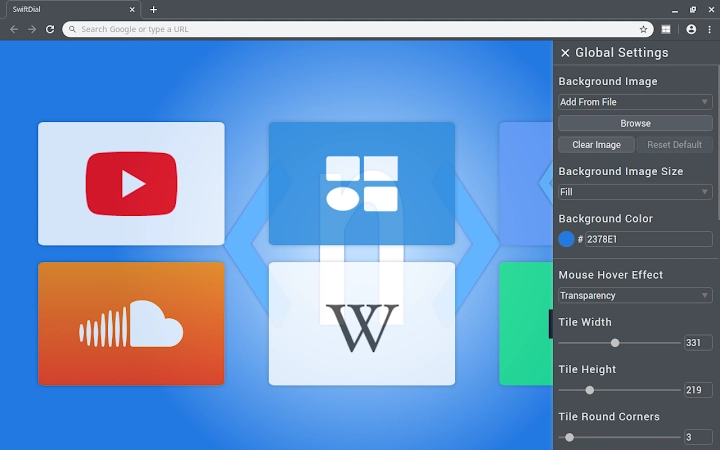
SwiftDial Dark is a browser theme designed to align the appearance of your browser with the sleek, dark aesthetic of the SwiftDial homepage. Tailored for users who prefer a minimalist, high-contrast interface, this theme enhances visual comfort during extended browsing sessions. It transforms the default new tab page into a dark-themed speed dial interface, offering quick access to frequently visited websites. The theme is part of the SwiftDial ecosystem, which emphasizes customization and usability across modern web browsers.
Target users include individuals seeking a visually cohesive browsing environment, especially those who use SwiftDial as their primary speed dial or home page. It is ideal for professionals, students, and casual users who value both style and efficiency. The theme integrates seamlessly with the SwiftDial extension, ensuring a consistent look and feel across sessions. While the developer did not provide additional details about the underlying framework or development philosophy, the focus remains on aesthetic harmony and ease of use.
Real-world usage scenarios include daily web navigation, content consumption, and productivity workflows where visual fatigue reduction is a priority. The dark interface may also appeal to users who prefer low-light environments or those aiming to reduce screen glare during evening use.
Key Features & Capabilities
- Dark Interface Design – Applies a dark color scheme to the browser’s new tab page, reducing eye strain and enhancing contrast for faster navigation.
- Speed Dial Integration – Maintains the core functionality of SwiftDial’s speed dial layout, allowing quick access to favorite websites with a single click.
- Visual Consistency – Ensures the browser’s appearance matches the SwiftDial homepage, creating a unified experience across devices and platforms.
- Customizable Layout – Users can adjust the arrangement of shortcuts and icons based on personal preferences, supporting a tailored browsing experience.
- Lightweight Installation – At just 3.5 MB, the theme has a minimal footprint, ensuring fast loading and low resource consumption.
These features support efficient workflow management by reducing visual clutter and enabling rapid access to essential websites. The dark theme is particularly beneficial during prolonged use, such as research, content creation, or multitasking across multiple tabs. The integration with SwiftDial allows users to maintain their preferred layout while enjoying a visually refined interface.
User Interface, Workflow & Performance
The user interface of SwiftDial Dark is clean and intuitive, following the standard layout of the SwiftDial speed dial system. Navigation is straightforward, with a grid-based arrangement of bookmarks and shortcuts. The dark background enhances the visibility of icons and labels, improving readability and reducing cognitive load during frequent use.
Workflow efficiency is maintained through quick access to saved sites without requiring additional clicks or menu navigation. The theme does not alter the core functionality of the browser or the SwiftDial extension, preserving the user’s existing habits. The developer did not specify resource usage details, but the lightweight size suggests minimal impact on system performance.
Stability is expected to be consistent with the broader SwiftDial platform, which has been widely used across Windows and Mac environments. Performance observations are based on general software behavior patterns, with no reported issues related to crashes or lag under normal conditions.
Compatibility & System Requirements
SwiftDial Dark is compatible with Windows and Mac operating systems, ensuring broad accessibility for desktop users. The extension is designed for use with modern web browsers that support Chrome Web Store extensions, particularly Google Chrome. The software version is 1.0.1, with an installation size of 3.5 MB.
Exact system requirements were not listed. The developer did not provide additional information regarding CPU, RAM, or disk space needs. Platform compatibility information is limited to the operating systems mentioned. Users should ensure their browser is up to date to maintain optimal functionality.
Pros and Cons
Pros
- Provides a visually appealing dark interface for enhanced browsing comfort
- Seamlessly integrates with SwiftDial’s existing speed dial system
- Minimal file size ensures fast installation and low resource usage
- Supports customization for personal workflow preferences
- Available at no cost, making it accessible to all users
Cons
- Requires the SwiftDial extension to function fully
- No additional system requirements were specified
- Functionality is limited to the new tab page and does not extend to other browser elements
- May not suit users who prefer light-themed interfaces
- Updates may depend on the main SwiftDial extension’s release cycle
FAQ Section
Is SwiftDial Dark compatible with all browsers?
SwiftDial Dark is designed for browsers that support Chrome Web Store extensions, primarily Google Chrome. Compatibility with other browsers is not confirmed.
Is the theme safe to install?
As a browser extension distributed through the official Chrome Web Store, SwiftDial Dark undergoes Google’s security review process. It is considered secure for installation on supported platforms.
How do I update the theme?
Updates are automatically managed through the Chrome Web Store. Users should ensure their browser is updated and check for extension updates in the extension management page.
Can I use this theme without the SwiftDial extension?
No. SwiftDial Dark relies on the SwiftDial extension to function. It modifies the appearance of the SwiftDial speed dial page and cannot operate independently.
Is SwiftDial Dark available for offline use?
Yes. Once installed, the theme operates without requiring an internet connection. However, initial setup and updates may require online access.
Final Thoughts + CTA
SwiftDial Dark delivers a polished, functional enhancement for users who value a consistent, dark-themed browsing experience. Its seamless integration with the SwiftDial speed dial system ensures that visual appeal does not come at the cost of usability. The lightweight design and zero price point make it a compelling choice for both casual and power users seeking a refined new tab interface.
While its functionality is tied to the SwiftDial ecosystem, this limitation is balanced by the theme’s simplicity and reliability. For anyone already using SwiftDial, this dark variant offers a natural upgrade path to a more modern and comfortable interface.
Download SwiftDial Dark Theme now
Guides & Tutorials for SwiftDial Dark Theme for Chrome
How to install SwiftDial Dark Theme for Chrome
- Click the Preview / Download button above.
- Once redirected, accept the terms and click Install.
- Wait for the SwiftDial Dark Theme for Chrome download to finish on your device.
How to use SwiftDial Dark Theme for Chrome
This software is primarily used for its core features described above. Open the app after installation to explore its capabilities.
User Reviews for SwiftDial Dark Theme for Chrome 0
No reviews found





